Inside a Panchaayat case page: every element explained
Panchaayat Product Desk · Published 8 October 2026 · 6 min read
A guided tour of every element on a public Panchaayat case page — the status, the masked reference details, the source link, the company reply badge — and exactly what each one means for consumers and companies.
Every complaint on Panchaayat gets the same permanent page, with the same elements in the same place — whether it’s a one-line refund dispute or a drawn-out insurance appeal. Here’s what each part of that page is actually doing, and why it’s built the way it is.
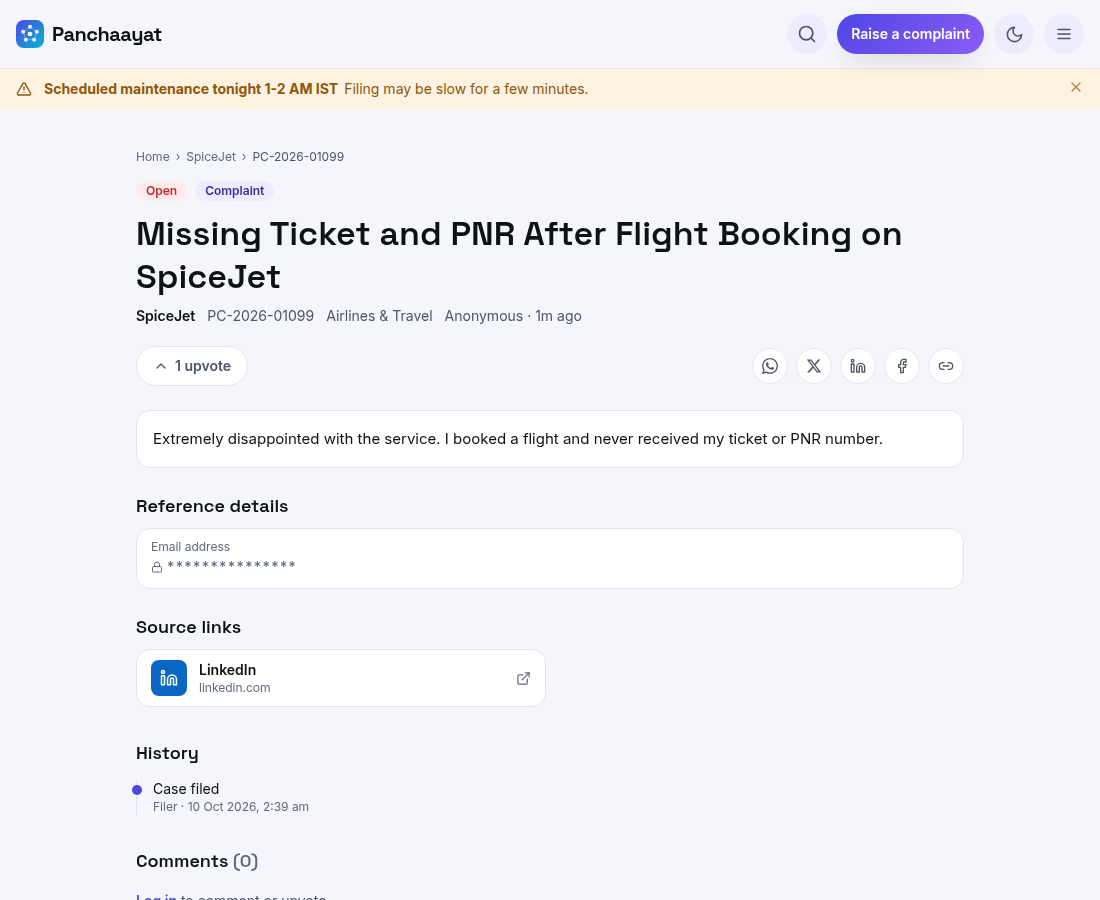
Case ID and status
Every case gets a permanent code like PC-2026-01099 the moment it’s filed — it never changes, even if the case is later edited, and it’s what you quote when escalating to a regulator or the National Consumer Helpline as a dated reference. The status — Open, In progress, Resolved, Closed — is the same four-state model for every case on the platform, so a company’s record is directly comparable across categories.
Reference details, masked
A filer can attach reference details — an order number, a policy number, an account ID — that the company needs to actually locate the record. These are masked on the public page by default: only the filer, the company’s approved representatives, and Panchaayat staff ever see the real values. Everyone else sees that a reference exists, not what it says.
Personal data, masked automatically in the text itself
Beyond the structured reference fields, the title and description themselves are scanned for personal data — phone numbers, email addresses, Aadhaar, PAN, bank account and card numbers — and masked as ****** in the public view, even if a filer pastes one directly into their complaint. The same authorised group (filer, company reps, staff) sees the original text; everyone else sees the complaint with the sensitive fragment hidden.
Source link
If a case started life as a tweet, a LinkedIn post or a Facebook/Instagram complaint, the filer can attach that original post as a source link — shown as the platform’s logo on the case card, with a tooltip explaining where it came from, and a click-through to the original. It’s a provenance trail, not a requirement: most cases are filed directly and have no source link at all.
The reply thread: public vs. internal
- Public reply — visible to everyone, carries the company’s verified badge when posted by an approved representative
- Internal note — visible only to the company’s own team, used to coordinate without the filer seeing the back-and-forth
- Upvotes — a visible signal of how many people are watching or affected by the same issue, without needing to file a duplicate case
A company badge is earned, not claimed — A reply only carries the verified-company badge if it comes from an approved representative of that specific company — anyone can comment, but only a verified rep's reply reads as an official company response.
Visibility: who can actually see a case
| Visibility | Who sees it |
|---|---|
| Public (default) | Anyone, including search engines |
| Private | Link-shareable but not listed in search or browse |
| Restricted | Only the filer, the company’s approved representatives, and Panchaayat staff |
A filer chooses this at the point of filing, and a restricted or hidden case still shows a precise reason to anyone who opens the link — "this case is not public" rather than a generic "not found," with a login prompt if that’s what’s needed to view it.
Real-world pattern
Why the page looks the same for every company
A small local business and a national brand get the exact same case-page layout, the same status model, the same masking rules. That consistency is deliberate — it’s what makes a company’s public record genuinely comparable, rather than each company getting to define its own version of "resolved."
See a live case page for yourself.
Browse open casesPut your complaint on the public record
Free, takes about a minute, and the company can reply in the open.
Raise a complaintFrequently asked questions
Can a company delete a case filed against it?
No — companies cannot delete or hide a case. Only Panchaayat moderation can hide a case that breaches platform rules, and that action is itself recorded.
Is my phone number or email safe if I include it in my complaint?
Reference details and personal data detected in the free text are masked automatically on the public page — only you, the company’s approved reps, and staff see the original.
What does the source-link logo on a case card mean?
It means the case was raised based on a public post on that platform — X, LinkedIn, Facebook or Instagram — and clicking it takes you to the original post, not the case itself.
More from the blog
Panchaayat Product Desk publishes general information to help consumers and companies understand their options — it is not legal advice. For a specific dispute, the escalation routes named above (National Consumer Helpline, sector regulators, Consumer Commissions) are the authoritative next step.